Skip to content
[Help]

Cant locate flash process

5 posts

Cant locate flash process

Posted Jun 3, 2016 5:45 pm

So my computer broke about a week ago and I have KHUT on my laptop and wanted to get it on my desktop. Unfortunately, inorder to get my computer working I had to recover it which basicly means I wiped it clean back to the day I bought it. So my computer works and I downloaded KHUT but when I choose the Chrome flash process a window pops up that says: "Can't locate flash process." Do I need to dowload some type of flash in order for it to work? 
RE: Cant locate flash process

Posted Jun 3, 2016 7:00 pm

Make sure you have adobe flash installed Flash Player Online Settings 
Also check if you installed the prerequisites to run the KHUT 
http://gcw.cz/trainer
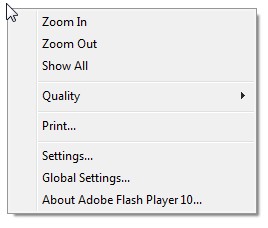
Lastly make sure the game you are trying to target is a flash game. A good rule of thumb is that you get the flash context menu by right clicking 

IMAGE SPOILER

RE: Cant locate flash process

Posted Jun 3, 2016 7:27 pm

So I do have Adobe flash player. Do I need to download all three prerequisites? And am I correct in saying that SAS 4 is Flash?

RE: Cant locate flash process

Posted Jun 3, 2016 7:45 pm

You can just press shift + Esc on your browser to open up task manager. Find the process ID of your Shockwave Flash, go to calculator and go to view. Click programmer and type the process ID into the calculator and then hex it. Whatever it hexed it into is your game process.


RE: Cant locate flash process

Posted Jun 4, 2016 1:27 pm
Dminerex_54 Posted on: 06/03/2016 3:27pm

So I do have Adobe flash player. Do I need to download all three prerequisites? And am I correct in saying that SAS 4 is Flash?


on browser sas4 is flash. Only .NET framework 4.0 is strictly required but if you run a old OS (or better discontinued like 'xp' you'll need an updated version of the win installer). The same goes for the vcredist patch for 64bit machines. It's written in the khut thread.