Skip to content

How To Download A Game

-migrated-

6 posts

How To Download A Game

Posted Jul 15, 2009 1:51 pm

I will use Stick RPG as an example in this tutorial.

Adblock Plus - download

Click the ABP icon in the top right corner.


Enter '.swf' where it says 'Search'.


Right click and choose 'Open in a new tab' from the drop down menu.
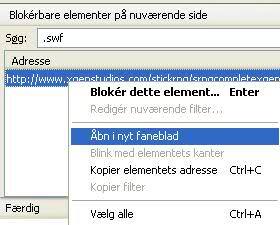

Press Ctrl + S on your keyboard to save the file.


Sothink SWF Catcher - download

Click the green arrow in the bottom of the screen and select the game from the drop down menu.

Re: How To Download A Game

Posted Nov 6, 2011 8:43 am

Perfectly explained. I got the original SWF file of the Game i wanted in no time.
I noticed there were 2 SWF files for the game I tried. There is one which is 5kb and other one is 945kb. Obviously the bigger one is the one which contains all the files required.

I guess the 5KB one just leads the real(945kb) one.

I'm learning. (broken image removed)

Re: How To Download A Game

Posted Jan 5, 2012 3:35 pm

My technique:
- goto the site
- right click
- view source code
- search for chat.kongregate.com/gamez...
- copy that link (it's a .swf file) [Example: http://chat.kongregate.com/gamez/0013/3 ... 1325522923]
- make a notepad file with <a href=insert link here.swf>h</a>
- save the notepad file, open it with your browser
- right-click the 'h', save as ...
- You now have the .swf file (broken image removed)

It's a bit more time consuming, but Ad Block Plus isn't working for me :p

Re: How To Download A Game

Posted Jan 16, 2012 8:10 am

This process is very detailed, I will download the game, thank you for sharing.

Re: How To Download A Game

Posted Feb 7, 2012 2:52 am

So how do you save .swf's that serve as shells making object subrequests for the actual .swf's?

example: Transformice