Finding right Flash process in chrome [Pictures] [Updated]
Step 1
Type this into your chrome browser

(chrome://memory)
Step 2
Make sure you have some sort of flash running. (Have a game open in another tab or window)
You're looking for a process of
(broken image removed)
(Pepper Plugin Shockwave Flash)
That number right next to it is the PID of it.
Get that number. You will need it
Note: Your number will be different every time!
Step 1
Open your windows calculator (If you don't use windows you can always use something to translate it into hex)
Open the view tab and select 'programmer'
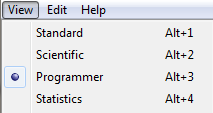
You will see your calculator will look a lot different nothing to worry about
Step 2
Type in that process ID (PID) from earlier
For me it was 3896
Now you're going to want to click the hex button (this will convert your decimal number into hexadecimal or hex)
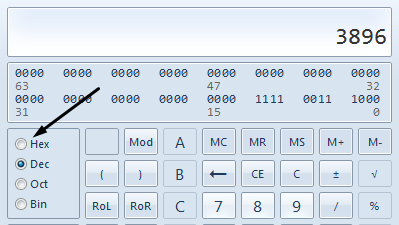
Mine converted to F38
Now keep the calculator open for the next part!
Step 3
Open cheat engine and click the first button with the computer and a magnifying glass on it

That should open a window like this
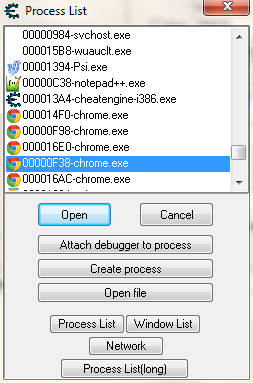
All you need to do is locate the chrome processes and find the one with the ID that matches the hex you converted (0's don't mean anything special)
Mine was 00000F38
Now you have set up cheat engine on chrome's flash process!
Step 1
Don't convert the PID into hex.
Step 2
Take your PID and search for that exact number in the list of processes
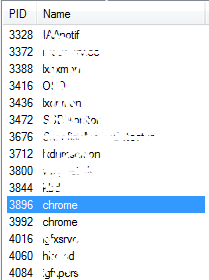
Mine was 3896 yours WILL be different
Note: If you're having a hard time finding the process just hit the PID column at the top and you can sort them by their number
Step 3
Just hit scan process after you find it.. Then dump it to disc!


