Skip to content

High ping

Pissing me off already

8 posts

High ping

Posted Mar 4, 2015 3:47 pm

Okay so, I play a bunch of games that don't really require low ping, such as Team Fortress 2 and all, but then there are some that do require it. For example, "Chivalry", "Pirates, Vikings & Knights II" and "Counter-Strike Source" (I think so though, I admit that I don't really play that one much anyway).

I should say first that my location is "Spain, Nueva Andalucia", I hope that's enough since I don't want no Konghack spy on my moustachio. The ISPs in Spain are not much, the most popular is Movistar, then Vodafone and then Orange. There are some not-so-popular ones like Yoigo and Ono (I think Euskanel as well but I dunno if that's the right name).

Back then, I had contracted for "Ya.Com", that company is now kind of dead since it belongs to Orange now. Orange has some little companies inside such as Amena and Jazztel. Why I tell you this? My router, while I'm with Movistar as ISP now, still belongs to Ya.com.

Should I actually get a Movistar router or it won't really mean shit to my old Ya.com router?

One of my friends told me about Amena, this guy tells me that he pays for 1MB internet for just 5 euros monthly. I don't get it, did he actually mean that he pays 1Mb of internet for 5 euros monthly? If so, isn't that such a weak internet connection? Well, I've checked both Movistar and Amena, Amena makes me pay 30 euros monthly for a "4G" Internet, the hell is that? Movistar makes me pay the same amount of euros, BUT NO TAXES and it's a fiber.

Anyway, I think it is better to tell you that I'm looking for a better ISP, but I don't think much of you guys can help me out since I'm in Spain and not any parts of America. So, I'm actually finding information about "ping optimization". Is there any way I can help up my ping without relying on getting another ISP? Should I contact my ISP about it? Should I get a different and new router?

If you wanna know how my ping really works, well, I get 70 ping min and 99 max when I'm on a Spanish server. On other places, it depends, but mostly 85 min and 106 max. You'd think this isn't much, you're right, but for games like Chivalry? I wanna play Chivalry yet I don't get even 50 ping on Spanish servers, you know how much that sucks for a melee oriented game? Yep, that's why I'm looking for help.

On a side note, my upload rate is 0.66Mbps. Yes, I am sure iti s Mbps, I tried it on SpeedTest.net, can even make a picture if you want. Is there any way I can improve it? How much upload rate should be optimal for at least 12 or 18 players on a server?

Hating the Soviet Union since 1924.
RE: High ping

Posted Mar 4, 2015 5:11 pm

For starters, you're most likely talking about your Modem/Gateway.  You'd typically plug your modem into a router, which would then go out to your network.  In some cases, the modem & router are one and the same and are typically called a gateway.  Fuck gateways.  They're really only useful if you have multiple IPs on one connection.

The only way you can improve your rates is to use better hardware and pay the internet company more to allow you more bandwidth.

As for upload speed, I always say about a half a meg per player.  So at 12 players, shoot for 6Mbps upstream.  18 would be 9Mbps upstream.


Everything's coming up KongHack!

"When you know nothing matters, the universe is yours" ~Rick Sanchez

RE: High ping

Posted Mar 5, 2015 8:43 pm

Yeah, I do mean a router. That thing is useless? How so? What's better then?

I'm still very bad at Mb and MB. Tell me, how much is 2MB of Upload rate? 16Mbs? Guess that's enough for my friend then.

Guess it's time to change this shitty old other-company router and ask those assholes about how much I have to pay for better ping.

Hating the Soviet Union since 1924.

RE: High ping

Posted Mar 6, 2015 2:53 am


8Mbps = 1MBps.  There are 8 bits in 1 byte.

Your router is your primary source for determining your INTERNAL network speed.  If you have a 100Mbps router, the fastest your LOCAL devices will be able to communicate with eachother is 100Mbps.  Unless you're on fast ass fiber, you don't have to worry about hitting your router's speed limit when it comes to online gaming.


Let's break the pipe down.

[Internet]-----[Modem]======[Router]@@@@@@@[Devices]

Your internet to modem speed is your bottleneck.  Let's say you have a 10Mbps internet connection.  The fastest you'll communicate across the interwebs is 10Mbps.
Next, your Modem has a speed to your router.  "Most" modems are 100Mbps LAN.  That is, the modem can only talk back and forth at 100Mbps speed.  This means anything plugged directly into your modem is capped at 100Mbps transfer speed.
Now let's say you have a gigabit router.  Anything on the right that has gigabit hardware can communicate with the router and other devices on your LAN at 1000Mbps speeds.

This is a very general over-simplification of things, but for the most part, that's how a home network will work.  My personal network consists of a 60/6Mbps Modem (U/D) with a gigabit port into a gigabit dual N router that feeds straight into my 24 port gigabit switch.  Things like switches have caps.  For example, my switch has 24 gigabit speed ports, but at full load can only manage about 12Gbps of data at once, effectively rendering all of the ports capped at 500Mbps.  Granted, this is a super rare scenario for home use (I mean, who's transfering terabytes of data over lan? :P ), shit like that can happen.

Anyway, I'm just rambling at this point.  Networking is fun.


Everything's coming up KongHack!

"When you know nothing matters, the universe is yours" ~Rick Sanchez

RE: High ping

Posted Mar 6, 2015 3:54 am

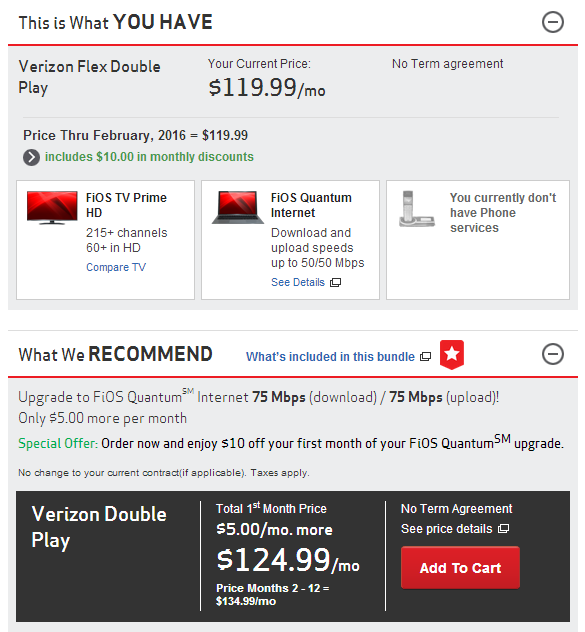
I just upgraded to 50/50 Mbps! Sorry, I have nothing to add to this, you've pretty much covered home networking 101, TiM.

New to Kong Hack and want to learn the basics? Check out the [Kong Hack 101] and the [Hacking 101].
Wanna learn how we make the hacks? Start with getting [the tools], then check these out: [AoB tutorial] | [.sol guide] | [Unity3d tutorial] | kadat's [video tutorials]
And if you don't already have it, check out the [Kong Hack Ultra Trainer]. You'll be glad you did!

RE: High ping

Posted Mar 6, 2015 1:00 pm
gates Posted on: 03/05/2015 10:54pm

I just upgraded to 50/50 Mbps! Sorry, I have nothing to add to this, you've pretty much covered home networking 101, TiM.


50 upstream?  That's fucking nuts!  How did you manage something like that?

The best we have in the area (at the moment) is 100/10, and it's about $100/mo.  I'd love having an upload speed like that.  I could actually run a CDN from home. :P


Everything's coming up KongHack!

"When you know nothing matters, the universe is yours" ~Rick Sanchez

RE: High ping

Posted Mar 6, 2015 7:57 pm
The Ignorant Masses Posted on: 03/06/2015 8:00am
gates Posted on: 03/05/2015 10:54pm

I just upgraded to 50/50 Mbps! Sorry, I have nothing to add to this, you've pretty much covered home networking 101, TiM.


50 upstream?  That's fucking nuts!  How did you manage something like that?

The best we have in the area (at the moment) is 100/10, and it's about $100/mo.  I'd love having an upload speed like that.  I could actually run a CDN from home. :P


FIOS FTW! I just noticed that recommendation...I may upgrade again...

New to Kong Hack and want to learn the basics? Check out the [Kong Hack 101] and the [Hacking 101].
Wanna learn how we make the hacks? Start with getting [the tools], then check these out: [AoB tutorial] | [.sol guide] | [Unity3d tutorial] | kadat's [video tutorials]
And if you don't already have it, check out the [Kong Hack Ultra Trainer]. You'll be glad you did!