Accessing and using the DEV console
As HTML (JS) based games continue to grow in numbers so will hacks using the developer console. The issue is that most people don't know what the developer console is, or how to access it so when they see something like:
Open your console for this one boys. MAKE SURE YOU TARGET THE IFRAME, or just open the frame in a new tab. You could also play the game here : https://swarmsim.github.io/ and just import/export.
$('body').scope().game._units.byName.meat._addCount(99999999999999999999999999999999999999999999999999999999999999999999999999999999999999999999999999999999999999999999999999999999999999999999);
Boom, that's it. There's a few units I didn't find (the code name is probably different than the display name), but overmind6 is the top meat producing unit. You can hit things like larva, energy, etc by changing the bolded MEAT to the proper name.
To get a list of names, simply hit
$('body').scope().game._units.byName
You might not understand what he's talking about or where to input the code. This little guide will remedy this.
Accessing the console
If you are using firefox, chrome, or IE 11 you can simply press F12 and the developers console will pop up. If you are using Opera you need to do the following.
1. Access the file menu by click the little button in the top left of the window.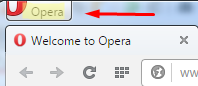
2. Click more tools.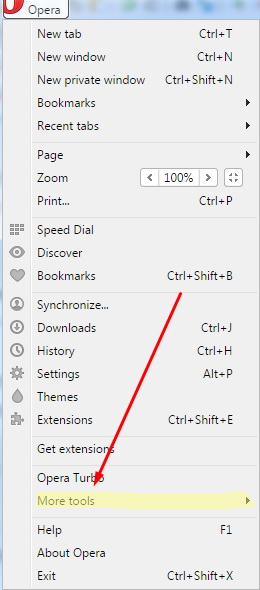
3. From there you click 'Enable Developer Tools'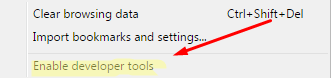
4. You can now access the Opera Dragonfly developer console by pressing ctrl + shift + i at the same time.
Selecting an Iframe
This is important, if you haven't selected the iframe the game is in hack WILL NOT work do to scope.
Chrome
It's right in the open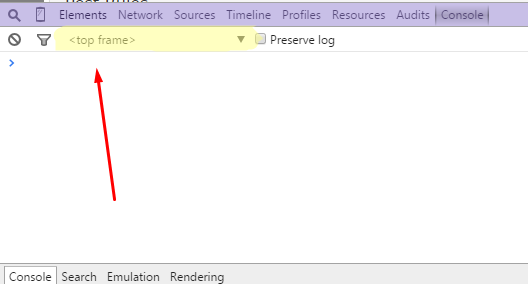
IE 11
Same as chrome, just to the right.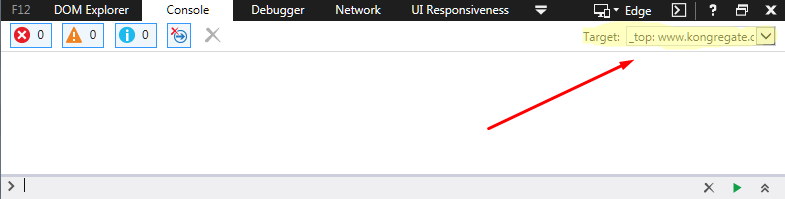
Opera
Litterally same as chrome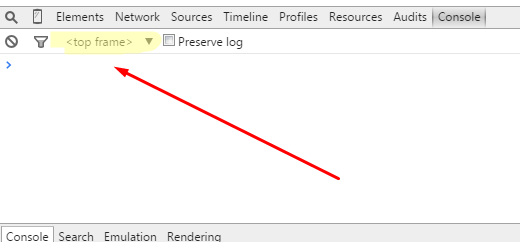
Firefox
Do you see it? No? Well that's because in Firefox you've gotta turn the button on.
1. Click the gear in the dev console.
2. Scroll down to the 'Available Toolbox Buttons' section and check 'Select an iframe as the currently targeted document.
3. Viola you can now select an iframe with Firefox
There you have it, that's how you open the dev console and select an iframe on the major browsers for the site!
Entering the JS
To use the Dev console you simply need to enter the javascript code/hack into the lower section as so...
Hit enter and if you're in the right iframe watch the hack work like a charm.
Stay curious my friends,
TLG (Galrick)
Billy-a-dick, billy-a-dick tic tac