Skip to content
[Help]

KHUT error (.dll) MAA

KHUT error (.dll) MAA

5 posts

KHUT error (.dll) MAA

Posted Jul 17, 2015 5:49 pm

Hi there,

Yesterday it was ok, but today its not working and I haven't change anything on my PC.
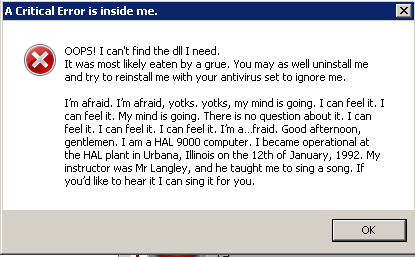
Here is what I did:
unistall, used ccleaner, install, ADM permisson (also allowed on antivirus and firewall), tried on chrome and firefox.
Just updated flash plugin, set permisson on Firefox, but nothing.

Please, any help?
Thank you.

(PS: apologies for my humble english) 
RE: KHUT error (.dll) MAA

Posted Jul 17, 2015 7:14 pm

some antivirus are not perfect and their ignore/whitelist doesn't work properly, might I suggest to do a fresh reinstall with antivirus completely shut off? (odds are you use one of the worst: Norton,Macafee,AVG)

RE: KHUT error (.dll) MAA

Posted Jul 17, 2015 10:44 pm
Zenwaichi Posted on: 07/17/2015 3:14pm

some antivirus are not perfect and their ignore/whitelist doesn't work properly, might I suggest to do a fresh reinstall with antivirus completely shut off? (odds are you use one of the worst: Norton,Macafee,AVG)


this ^

it seems like it is preventing one of the dll's from unpacking/installing properly.

if the problem keeps happening even when your antivirus or firewall is disabled, try manually deleting the apps folder and reinstalling the KHUT.
on windows 7 its located at C:\Users\USERNAME\AppData\Local\Apps

RE: KHUT error (.dll) MAA

Posted Jul 18, 2015 12:23 am

first off, your OS is 64 bit, so you should use the x64 version of the trainer.

Secondarily, it appears that khtrainer.dll is missing from your install directory.

when you use the x64 trainer version you will need to have the c++ redist also installed on your pc

I use this AoB tool to make all the AoBs I post. Try the online version if you dont feel like downloading it.
"Obviously, windows are central to Windows. They are so important that they named the operating system after them. But what is a window?"

RE: KHUT error (.dll) MAA

Posted Jul 18, 2015 12:59 am
Zenwaichi Posted on: 07/17/2015 3:14pm

some antivirus are not perfect and their ignore/whitelist doesn't work properly, might I suggest to do a fresh reinstall with antivirus completely shut off? (odds are you use one of the worst: Norton,Macafee,AVG)

I'm using Avast.
Anyway, I did what you said and it's perfect!
Thank you ;)
 

thenewcomer Posted on: 07/17/2015 6:44pm
Zenwaichi Posted on: 07/17/2015 3:14pm

some antivirus are not perfect and their ignore/whitelist doesn't work properly, might I suggest to do a fresh reinstall with antivirus completely shut off? (odds are you use one of the worst: Norton,Macafee,AVG)


this ^

it seems like it is preventing one of the dll's from unpacking/installing properly.

if the problem keeps happening even when your antivirus or firewall is disabled, try manually deleting the apps folder and reinstalling the KHUT.
on windows 7 its located at C:\Users\USERNAME\AppData\Local\Apps

Thanks to show me the location, it also helped.